Rotation
Style what you own. Shop what's missing. A closet and outfit planner that connects what people already own with what they buy next.
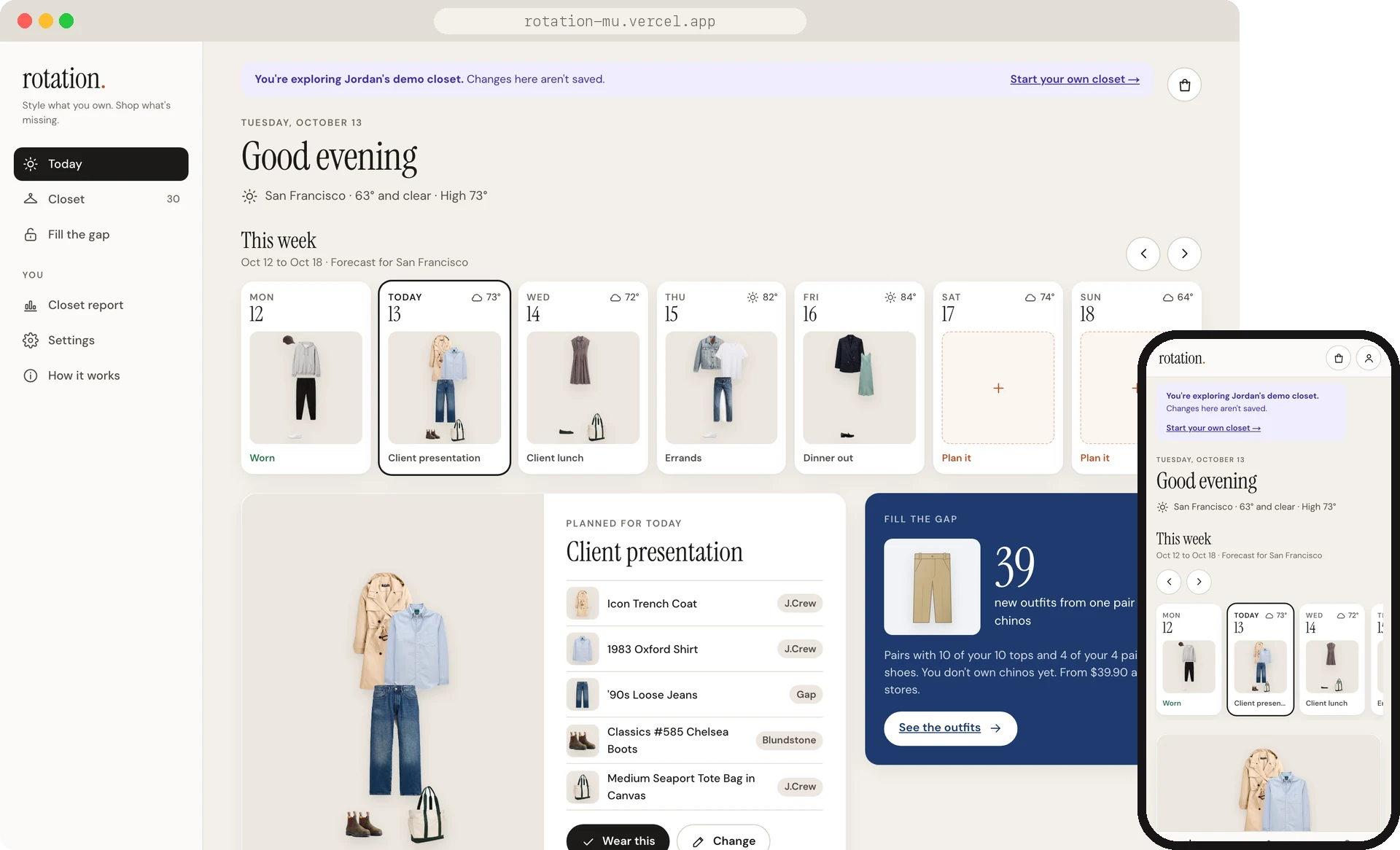
Fashion and visuals have always interested me, but it's hard to remember everything you own, let alone how it all goes together. While upskilling with agentic workflows, I realized an outfit catalog was something I could build, and one I'd stay motivated to finish.
A product design role at a big apparel retailer pushed me to make it a fully working product. I could see how a brand like Gap or Abercrombie could use it to boost sales, recommending new releases that go with what customers already own.
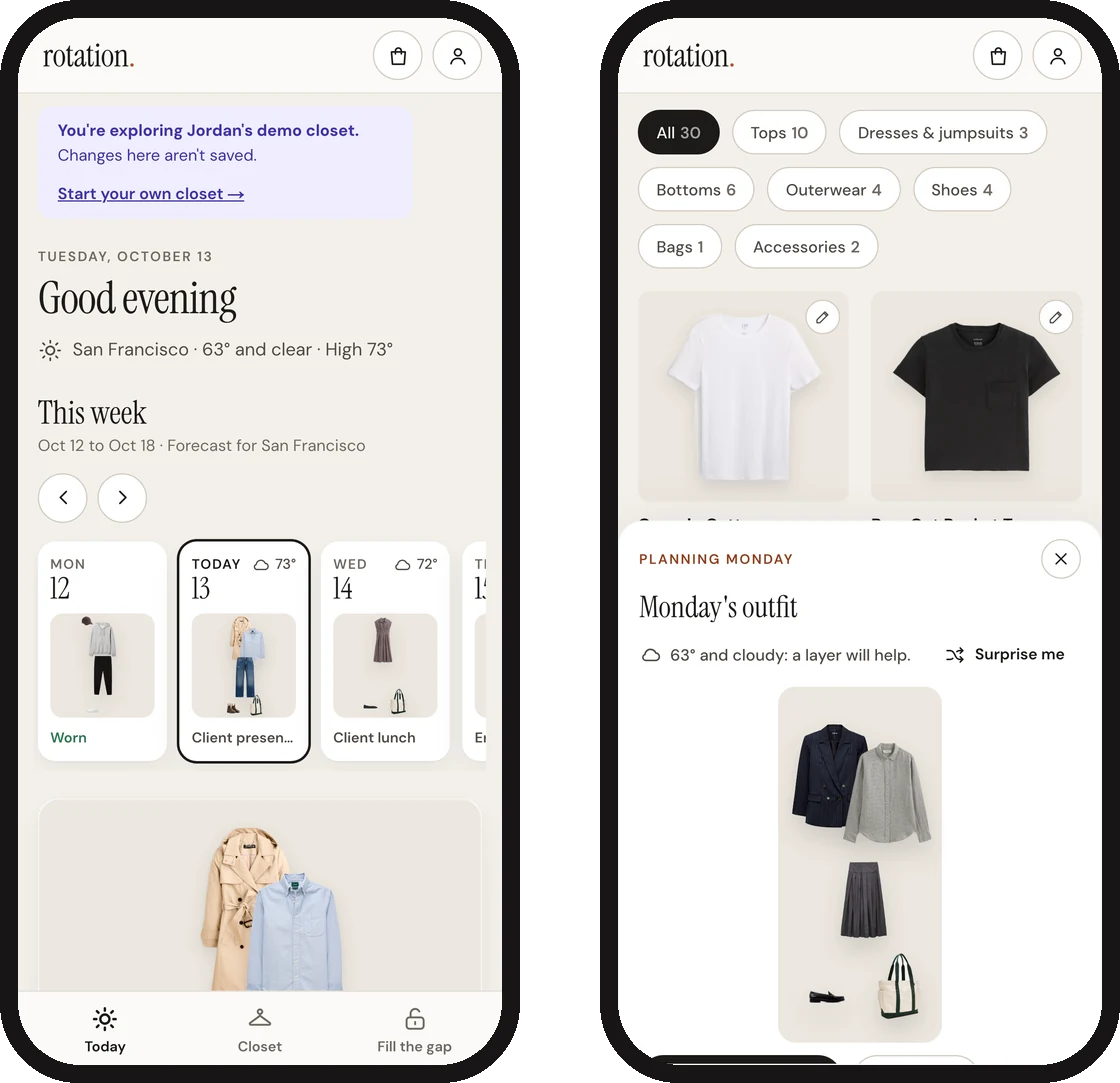
Rotation lets you add what you own, plan each day's outfit around the forecast, and when something's missing, see the one piece that would unlock the most new outfits, with options from several stores in your size. It started as a concept for one retailer and turned into an app that works with any store. In one week it went from a strategy doc to a live web app and a phone app.
Clothes we buy and forget about
Most of us have clothes we rarely wear, and once an order arrives, the store doesn't hear from us again until the next sale email. When I looked through existing research and six closet and styling apps, a few patterns kept coming up:
- A lot of clothing goes unworn. Indyx, a closet app tracking over 10 million items, found that about a quarter of the average closet isn't worn in a year. WRAP UK found 26%.
- Returns are costly. Coresight puts online apparel returns at 24.4%, and more than half come down to size and fit.
- Getting clothes into an app is the hardest part. Every closet app I looked at has you photograph each piece by hand. Indyx even offers a $295 in-home service to do it for you.
That last one stood out to me. A retailer already knows what its customers bought. If you shop at Madewell, they have every piece you've ordered, with clean product photos, sizes and colors. A closet built from that history would skip the tedious setup, and give the retailer a helpful reason to show up between orders.
Mapping the closet onto the shopping journey
I first imagined Rotation inside a company that runs several fashion brands under one roof. I mapped six stages of the customer journey, what a shopper is thinking at each one, and how the closet could help, along with the metric each moment could move. The last stage, reordering, leads back into discovery, so the journey becomes a loop.
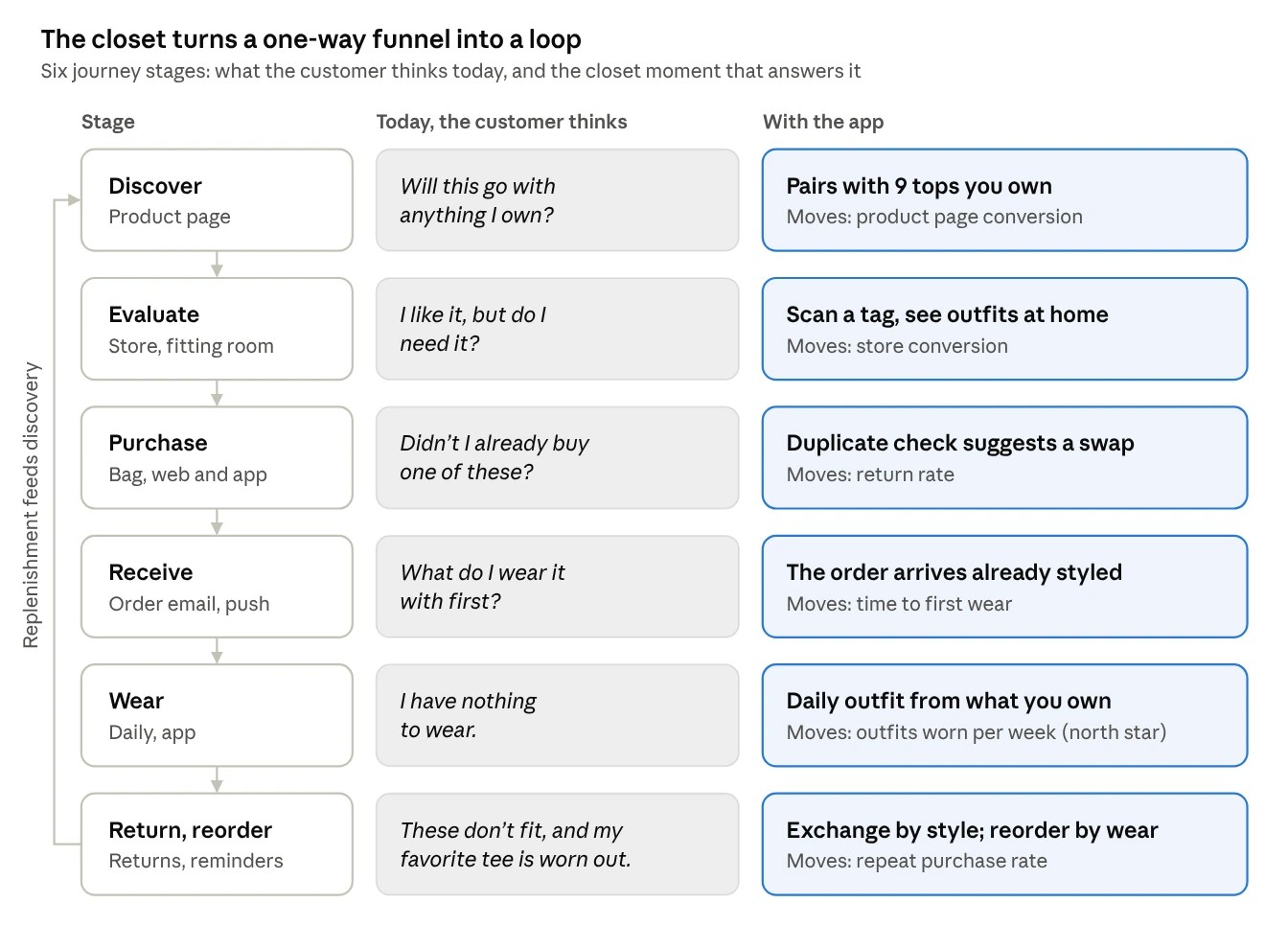
In the concept prototype, each moment lived in a different channel: a "goes with what you own" module on the product page, a tag scan in the fitting room, a duplicate check in the shopping bag, an order email with outfit ideas, an outfit on the lock screen, and exchanges based on style. For a company with several brands, I proposed sharing one closet and one recommendation engine across all of them, while each brand's app keeps its own catalog and voice.
From one retailer to any store
In the concept, suggestions came in order: the customer's pieces from that retailer first, then the rest of their closet, then the retailer's new arrivals. I kept the rest of their closet in the mix on purpose, since leaving it out would have made every suggestion feel like an ad.
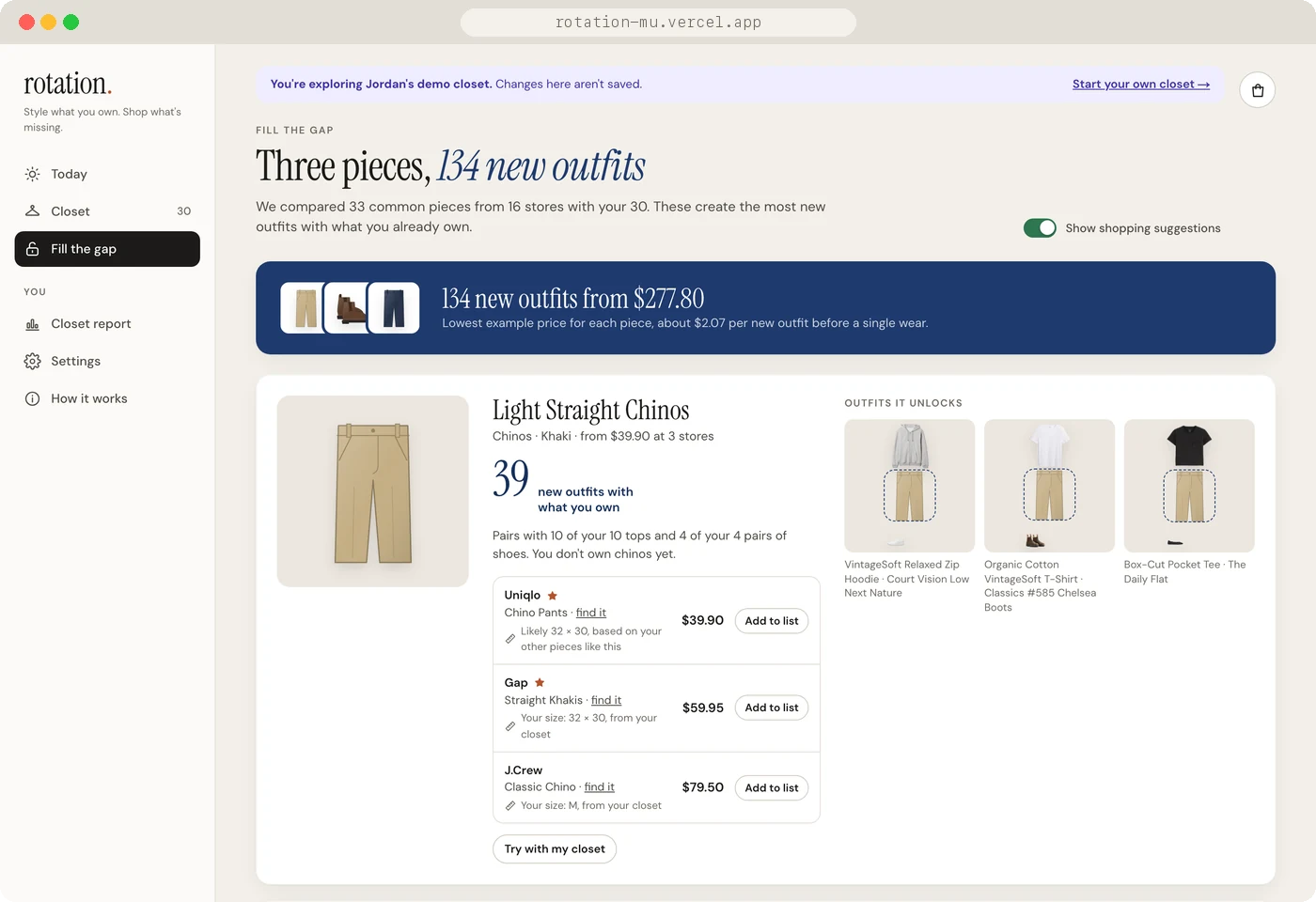
When I turned it into an app anyone could use, it needed to work with every store, so Rotation now starts with the piece, then the store. It figures out what kind of piece your closet is missing, like light straight chinos, then shows options from several stores, sorted by your favorite stores and then by price. If Rotation ever earns commissions, they'll be disclosed and won't affect the order. The recommendation engine and the journey thinking carried over. Inside Everlane's own app, though, purchase sync and putting Everlane first would still make sense.
Recommending the piece that adds the most outfits
Each suggestion gets an Outfit Unlock score: the number of new outfits it creates with what you already own. Rotation ranks suggestions by that score, adjusted for your style and for anything similar you already have:
In the 30-piece demo closet, Rotation finds 199 outfits, and one pair of light straight chinos would add 39 more. Each suggestion explains itself in one line ("Pairs with 10 of your 10 tops and 4 of your 4 pairs of shoes") and shows the outfits it unlocks, your likely size at each store, and a way to try it with your closet first.
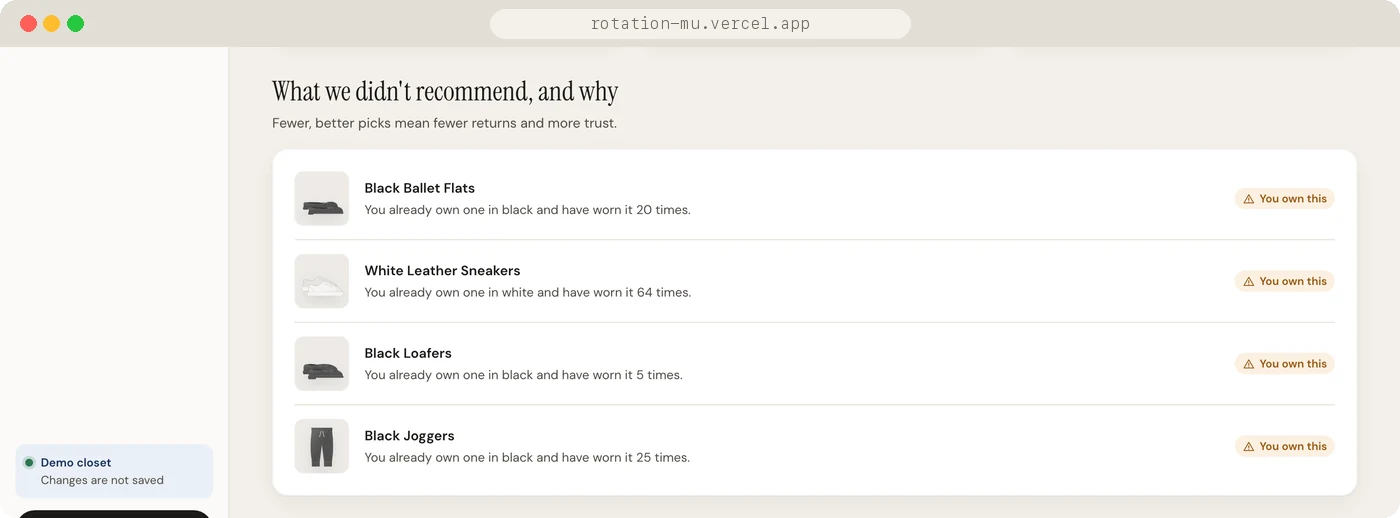
I wanted people to be able to trust the suggestions, and my hope is that fewer, better picks lead to fewer returns. Rotation never suggests something too similar to what you own, and it shows what it left out and why. You can turn shopping off completely, and a short note explains how suggestions are ranked and how the app could make money.
Simplifying as I went
I used each version myself and wrote down every change in direction, with the context, the options and the trade-offs. Most of the changes ended up removing something.
01Six tabs became three
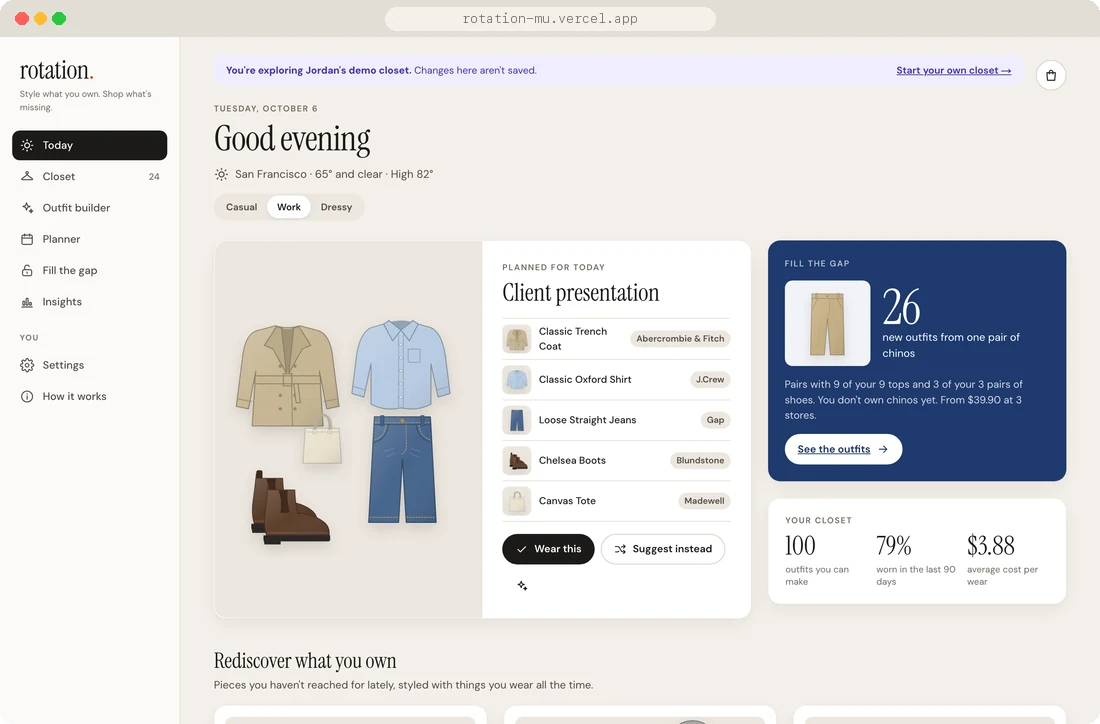
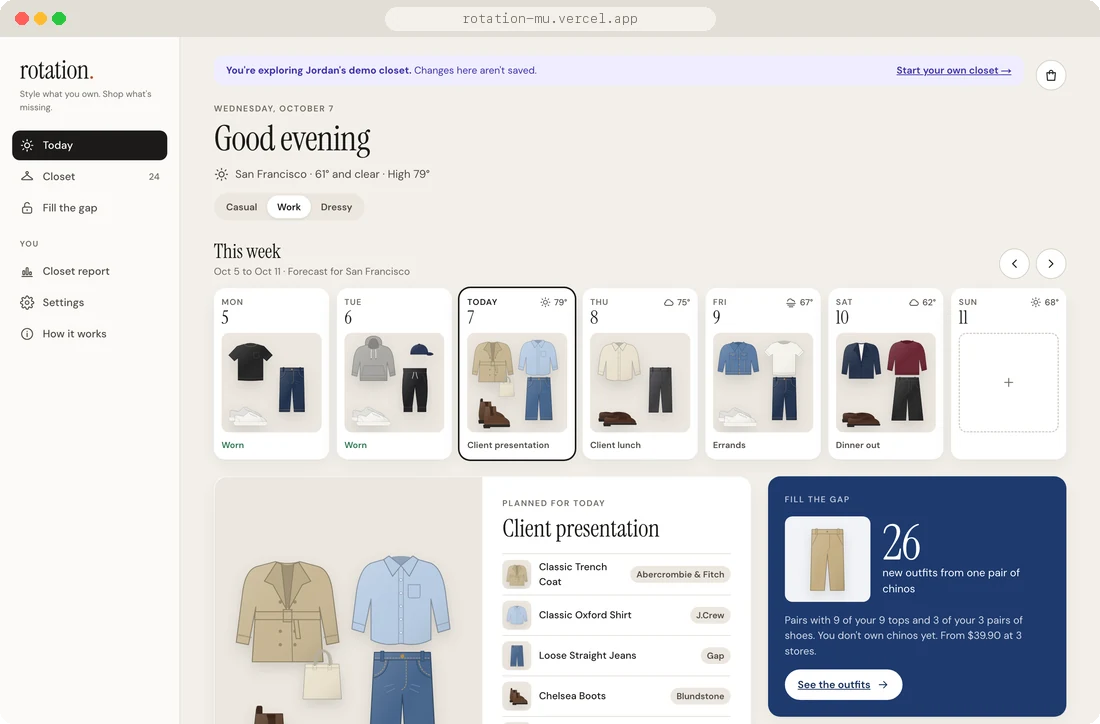
The first working version had six tabs, and side by side they overlapped. Today and Planner showed the same outfit, the Builder repeated the Closet, and the same stats showed up in three places. I cut it down to three tabs that match the tagline: Today for getting dressed, Closet for what you own, and Fill the gap for what's missing. The stats moved into a Closet report you can open when you want it.
Before · six tabs
After · three tabs
02Leaving empty days empty
Days with nothing planned used to show a ready-made suggestion, so they looked planned, and Rotation's pick came before the person's. Now an empty day shows the forecast and a way to start an outfit, beginning with a piece you feel like wearing. Surprise me lets Rotation choose in one tap, and Repeat an outfit brings back something you've worn before.
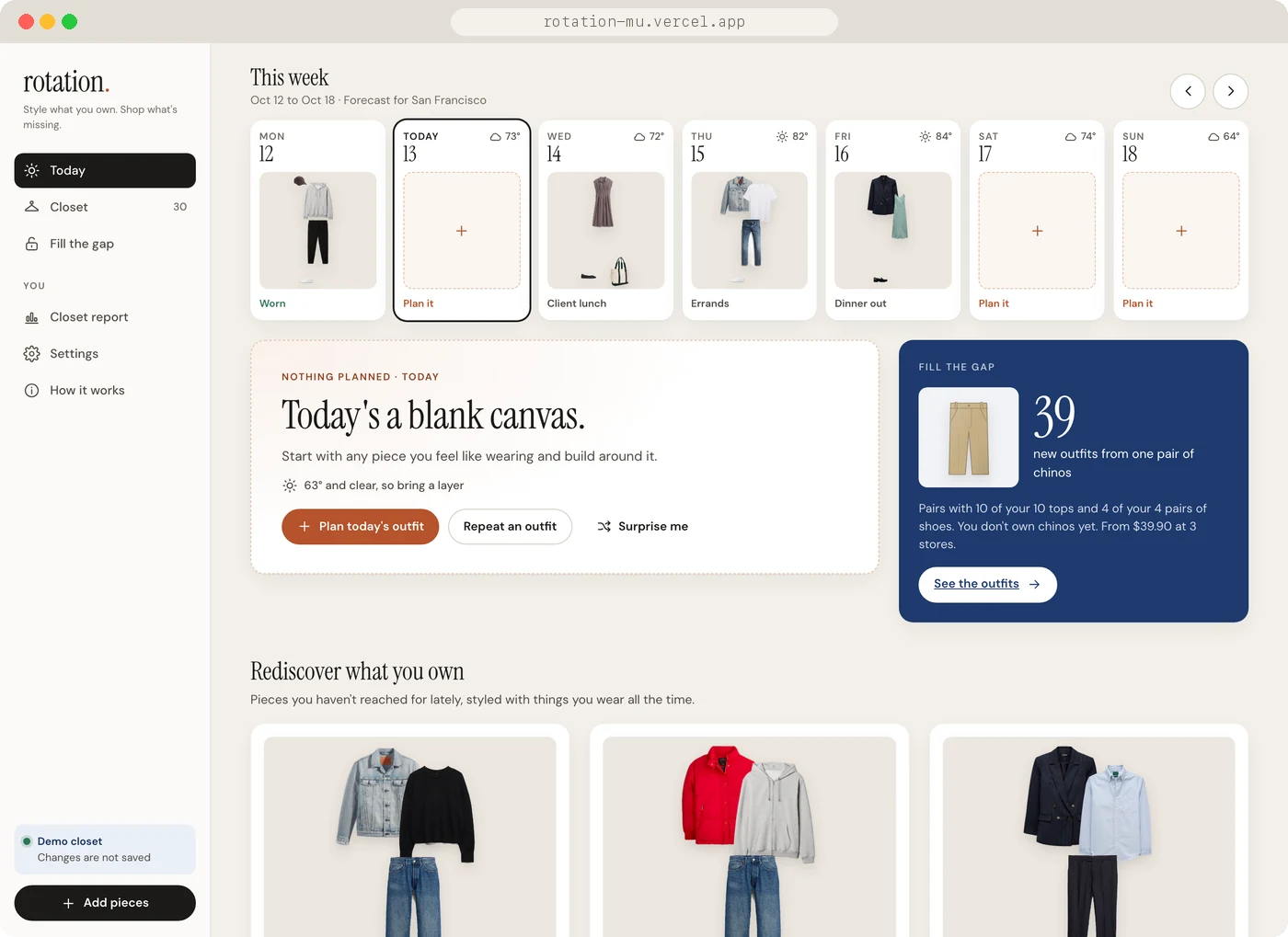
03One outfit board, at real size
Planning a day used a step-by-step flow (top, then bottom, then shoes), while the closet had a free-form board. The steps felt rigid, and the same outfit looked different depending on where you started. I replaced both with one outfit board that works like a design canvas, where you can drag, resize and layer pieces, with keyboard shortcuts. Pieces keep their real relative sizes, so an outfit looks like clothes laid out on a bed. Planning a day opens that same board on Today.
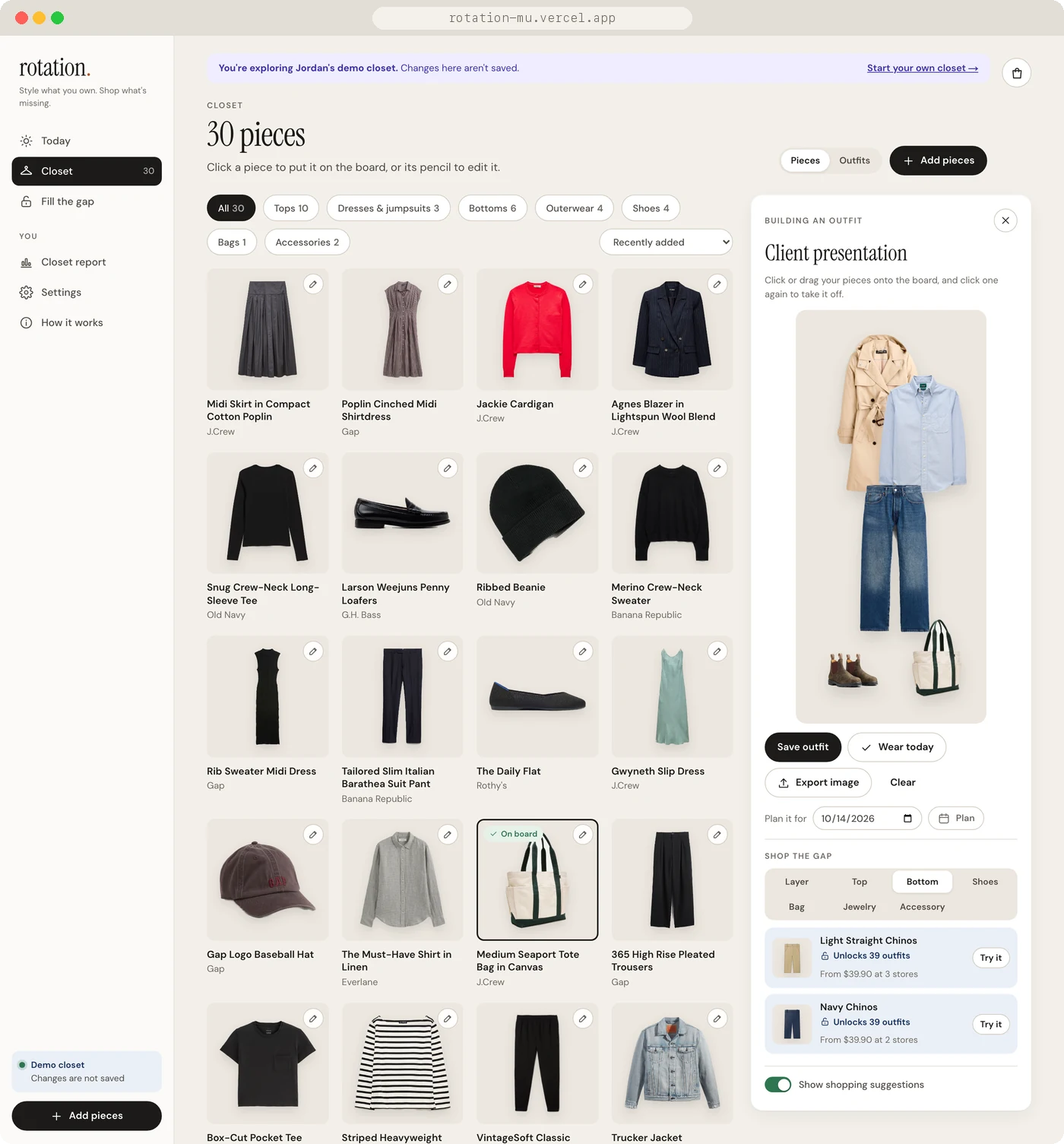
04Letting people wear what they like
The builder used to fade out "clashing" pieces and show warnings like "Burgundy and Rust compete for attention." I removed that. A pairing the rules call a clash might be exactly what someone wants to wear. Rotation still uses its pairing rules for its own suggestions (Surprise me, Rediscover and Outfit Unlock), but it doesn't comment on outfits people put together themselves.
05Asking when the AI isn't sure
When you add a piece from a photo or product link, two small vision models run on the device, so your photos never leave it: one finds clothing on a person, and one outlines objects. Rotation then cuts out the piece you meant. When it can't tell, like with an outfit photo or a flat lay, it shows what it found and asks, which also means you can add several pieces from one photo. Claude suggests each piece's type, color and name, and you confirm them.
It didn't always get it right. On beige product backgrounds, the clothing model mistook the background for skin and cut out the wrong shape. I changed the check to look for the shape of a person, then tested it on 99 real store photos. Misread product shots dropped from 18 of 55 to 3, and all 44 photos of people were still recognized.
Building for web and phone
I set the direction and made the product decisions, and worked with Claude Code for research, prototyping and code. At each milestone I saved screenshots, a snapshot of the strategy and the decisions behind it, so I can trace every change back to why I made it.
Claude was quick to mock up screens full of fun features, but the flows behind them often had friction. You couldn't paste or drag in an image when adding a piece, the closet forced its own sort order instead of letting you choose, and adding from a product link sometimes picked the wrong photo. It also lost track of what you were doing: planning an outfit used to jump from Today over to the Closet tab, away from where you started. A big part of my role was catching these moments by using the app myself, then smoothing them out so the experience felt as easy as the mockups looked.
- Web: Next.js, React and TypeScript on Vercel, with Supabase for accounts and sync
- Phone: React Native and Expo, sharing the web app's engine, so both give the same outfits and suggestions
- Design system: documented in Storybook, from color tokens and type to every page at phone, tablet and desktop widths, in light and dark. Colors have contrast checks, the outfit board works with a keyboard, and every Storybook story runs an automated accessibility check.
- Visual direction: I mocked up four directions (whimsical, Y2K, editorial and streetwear) and kept the quiet editorial look. A calm interface lets the clothes, from any store, bring the color.
Testing with real shoppers
So far I'm the main person who has used Rotation, and some decisions, like keeping stats in the background, haven't been tested with anyone else yet. Next, I'd like to:
- Interview 5–8 shoppers about how they get dressed and why they return things
- Run usability tests with 5 people adding their closet and planning a week
- Open sign-up with a custom sign-in email, and connect real product feeds to Fill the gap
At a retailer like Gap or J.Crew, I'd start small: a "goes with what you own" module on the product page, built from the customer's purchase history and measured on conversion and returns against a holdout group. If it helps both, that's a good sign the rest of the journey is worth building. Beyond that, the main thing I'd watch is how many outfits people wear each week, since it shows whether Rotation has become part of how they get dressed.